How to Build an ATS-Friendly Resume in 2026 (Free Tool, Step-by-Step Guide)
Everything you actually need to know about beating resume-screening software — and the free, private tool that does the formatting for you.
Why your resume might never reach a human
You send out fifty applications. You get three replies. It’s not always your experience — often it’s the format.
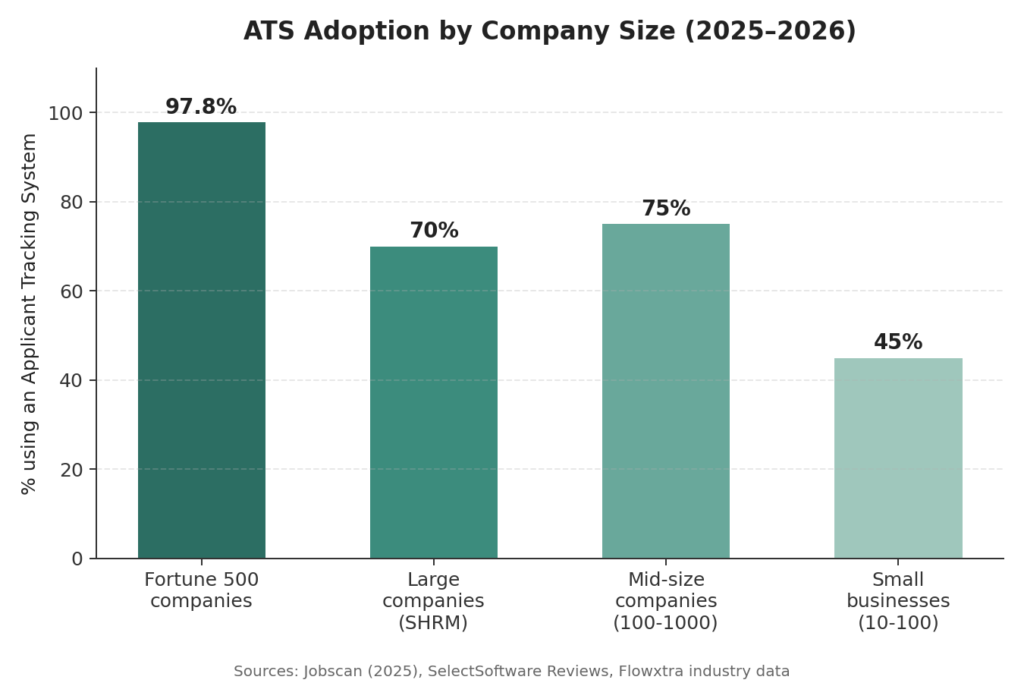
Nearly every large employer now runs resumes through software before a person ever opens them. According to Jobscan’s 2025 audit of Fortune 500 hiring pages, 97.8% of Fortune 500 companies used a detectable Applicant Tracking System (ATS). Separately, a Resume Genius survey of 1,000 U.S. hiring managers found 71% of hiring managers use an ATS, and 79% of companies have automated at least part of their hiring process.
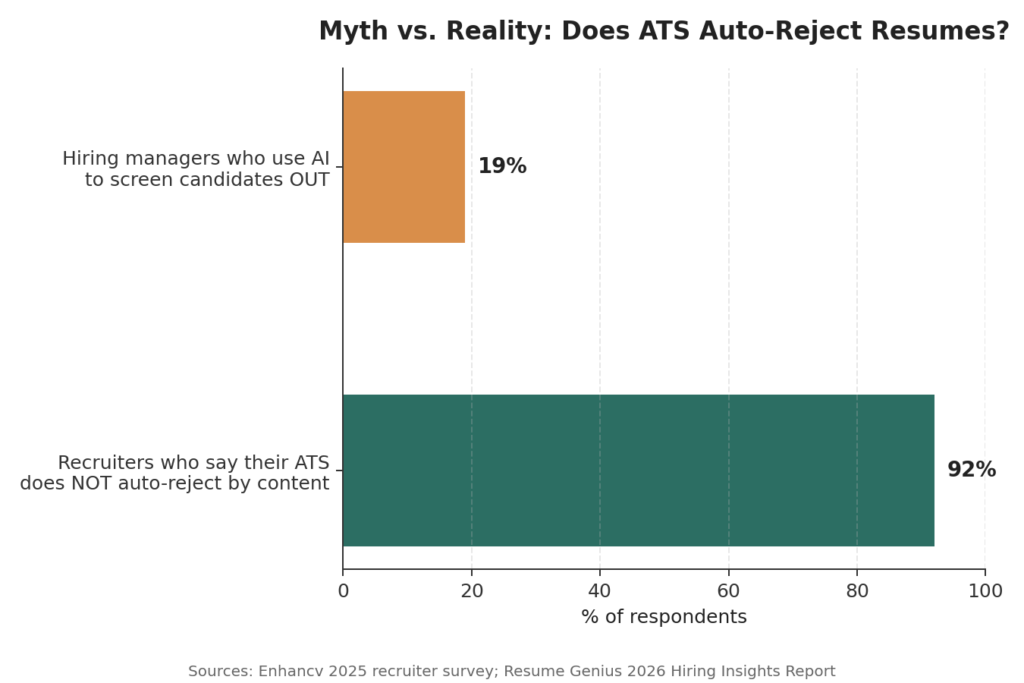
Here’s the part most “resume tips” articles get wrong: the popular claim that 75% of resumes are auto-rejected by ATS before a human sees them isn’t backed by real data — it traces back to a defunct company’s unverified 2012 press release. A 2025 Enhancv survey of recruiters across more than ten ATS platforms found that 92% said their system does not auto-reject resumes based on content — it ranks and organizes them for a recruiter to review. Similarly, a 2026 hiring-manager survey found only 19% use AI to actively screen candidates out before human review.
What this actually means for you: your resume probably won’t be silently deleted by a robot. But it absolutely can be pushed to the bottom of the pile — misread, garbled, or stripped of key information — if the file, layout, or keywords aren’t ATS-friendly. That’s a fixable problem, and it’s the one this guide (and the free Resume Maker) is built to solve.
The stats at a glance
| Stat | Figure | Source |
|---|---|---|
| Fortune 500 companies using a detectable ATS | 97.8% | Jobscan, 2025 |
| Hiring managers who personally use an ATS | 71% | Resume Genius, 2026 |
| Companies with at least part of hiring automated | 79% | Resume Genius, 2026 |
| Recruiters whose ATS does not auto-reject by content | 92% | Enhancv recruiter survey, 2025 |
| Hiring managers who use AI to actively screen candidates out | 19% | Resume Genius, 2026 |
| Recruiters who say an ATS reduced their time-to-hire | 86%+ | SelectSoftware Reviews |
| Global ATS software market, 2024 → projected 2034 | $2.7B → $5.7B | Global Market Insights |
What an ATS actually does with your resume
When you upload a resume to a job portal, the ATS doesn’t “read” it the way a person does. It parses the file, pulls text into structured fields (name, job titles, dates, skills, education), and stores that data so a recruiter can search, filter, and rank candidates by keyword relevance. Two things break this process most often:
- Complex layouts. Multi-column designs, text boxes, tables, and graphics-heavy templates can scramble the parsing order — your 2023 job title might get read after your 2019 one, or your skills column might merge into your work history.
- Missing keywords. Recruiters (and the AI layered on top of many modern ATS platforms) search for exact terms from the job description. If the posting says “project management” and your resume says “managed projects,” some systems won’t connect the two.
A resume can be visually beautiful and still perform badly here. That’s why the safest approach is a clean, single-column structure with standard section headers — and it’s exactly how every template in the Resume Maker is built.
Career expert insight: Amanda Menin, an HR and career-strategy expert with 20+ years across tech, healthcare, and consulting, notes that for tech candidates specifically, understanding how ATS platforms parse an application can be the deciding factor in whether a candidate advances or gets filtered out.
Job search strategist Tracie Close makes a similar point about resume summaries: with hiring decisions often made in seconds, a summary needs to speak clearly to both the recruiter reading it and the ATS parsing it — not just one or the other.
7 formatting rules that keep your resume ATS-safe
- Stick to one column. Side-by-side columns are the single biggest cause of scrambled parsing.
- Use standard section headings. “Work Experience,” “Education,” “Skills” — not creative alternatives like “My Journey” or “Toolbox.”
- Avoid text inside images or icons. If your contact info or skills live inside a graphic, most ATS software can’t read it at all.
- Keep fonts simple and web-safe. Decorative or unusual fonts can render as broken characters when parsed.
- Save as PDF or Word — but check which the job posting wants. Most modern ATS platforms handle both well, though some older systems still prefer .docx.
- Spell out acronyms at least once. “Search Engine Optimization (SEO)” covers you whether the system searches for the long form or the short form.
- Match language from the job description. Mirror the exact skill and title phrasing the employer used, where it’s honestly true of your experience.
Step-by-step: building your resume with InstaFontStudio’s Resume Maker
The Resume Maker is a free, browser-based tool that handles the formatting rules above automatically, so you can focus on the content. Here’s how to use it from start to finish.
1. Pick a layout and color theme
Open the Resume Maker and choose a template from the layout gallery. Every layout is single-column and ATS-tested by design — the visual differences are in spacing, section order, and typography, not in anything that would confuse a parser. Pick a color theme and a heading font that suits your industry (more on that below), and switch between them at any time without losing your content.
[Image placeholder — Screenshot: the Resume Maker template gallery showing layout thumbnails and the color theme picker]
2. Fill in your details
Work through the guided sections: contact info, summary, work experience, education, and skills. Because the builder generates clean, structured HTML/PDF output behind the scenes, your bullet points and dates will stay parseable no matter which template you chose.
[Image placeholder — Screenshot: the resume editor with a work-experience section being filled in]
3. Run the ATS Compatibility Check
Before you download anything, use the built-in ATS Score feature. It checks your resume’s structure — headings, formatting, contact fields — and flags anything that could trip up a parser, so you catch formatting problems before a recruiter ever does.
4. Match your resume to a specific job
This is the feature most resume builders skip. Paste a job description into the Match to job tool, and it compares it against your resume to surface important keywords you’re missing. Rather than guessing at what to add, you get a concrete list pulled directly from the posting — the fastest way to tailor your resume for each application instead of sending the same generic version everywhere.
[Image placeholder — Screenshot: the “Match to job” panel with a job description pasted in and missing keywords highlighted]
A worked example. Say a job posting includes this line:
“Looking for a Marketing Coordinator with experience in email marketing, campaign analytics, and cross-functional collaboration with sales teams.”
If your resume currently says “Wrote newsletters and worked with the sales team on promotions,” the Match to Job tool would flag that you’re missing the exact terms email marketing, campaign analytics, and cross-functional collaboration — even though your experience genuinely covers them. Rewriting the bullet to “Led email marketing campaigns and campaign analytics reporting, in cross-functional collaboration with the sales team” keeps it honest while making sure both a keyword-matching system and a skimming recruiter immediately see the overlap with the posting.
5. Add a matching cover letter
Switch to the Cover Letter tab to build a companion letter in the same visual style as your resume, so the two documents look like a coordinated set when a hiring manager opens them.
6. Download or share
When you’re happy with it, download a PDF or a .docx Word file — whichever the job posting asks for. If you want feedback from a friend, mentor, or career coach first, use the Share feature to generate a read-only link (your photo is automatically left out to keep the link short and private).
7. Everything stays private
The tool saves your resume only in your own browser — nothing is uploaded to a server, there’s no account to create, and no email required. You can close the tab, come back later, and pick up exactly where you left off with Continue last resume.
Pros and cons of using an online resume builder
Online builders aren’t the right fit for 100% of situations. Here’s an honest breakdown so you can decide if it fits yours.
Pros
- Speed. A polished, ATS-safe resume in under 30 minutes instead of hours fighting Word’s formatting.
- Built-in ATS safety. Templates are structured correctly by default — you can’t accidentally create a scrambled multi-column layout.
- Instant tailoring. The Match to Job feature turns “tailor your resume for every application” from a chore into a two-minute step.
- No design skill required. Professional spacing, typography, and color pairing are handled for you.
- Free and private (with InstaFontStudio specifically). No paywalled templates, no forced account, no data leaving your browser.
- Easy to maintain multiple versions. Keeping separate resumes for different job types is far easier than managing multiple Word files.
Cons
- Less flexibility than a blank document for someone who wants a highly unconventional or portfolio-style layout (common in some design and creative fields).
- You still have to write the content. A builder fixes formatting and structure — it won’t invent your achievements or numbers for you.
- Browser-only storage cuts both ways. It’s private by default, but if you clear your browser data without exporting a backup, you could lose your draft — get in the habit of downloading a copy once you’re happy with it.
- Template fatigue is possible. With any builder, recruiters who screen thousands of resumes may recognize common layouts — solid, honest content is what actually differentiates you, not the template alone.
For most job seekers, the time saved and the built-in ATS safety outweigh these trade-offs — but it’s worth going in with clear eyes.
By the numbers: SelectSoftware Reviews reports that 86%+ of recruiters say their ATS reduced time-to-hire, and 94% say it had a positive overall impact on their hiring process — evidence that the systems standing between you and an interview are, on balance, built to move qualified candidates through faster, not just filter them out.
Why the InstaFontStudio Resume Maker actually helps you land your dream job
Everything above is general resume advice — but here’s the direct case for why using a purpose-built, free tool changes your actual odds, backed by data rather than marketing claims.
1. Tailoring is the single biggest lever — and most people skip it because it’s tedious
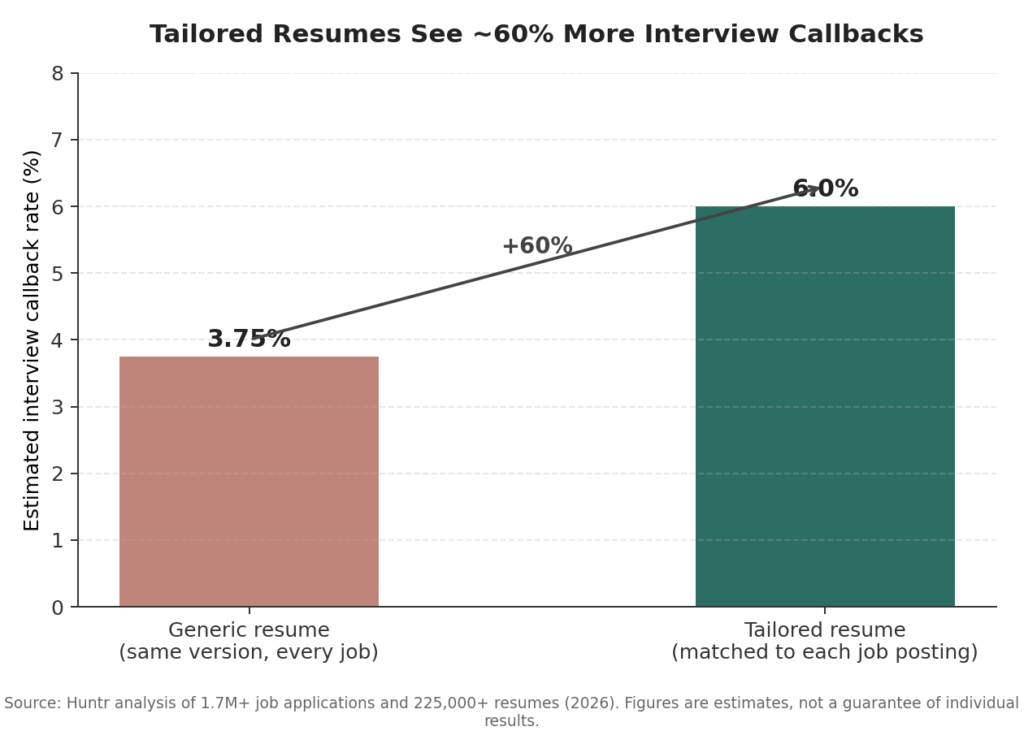
Research from Huntr, based on an analysis of over 1.7 million job applications and 225,000+ resumes, found that tailored resumes get roughly 60% more interview callbacks than generic ones sent to every employer. The reason most job seekers still don’t tailor each application isn’t a lack of knowledge — it’s that rewriting a resume by hand for every posting takes real time.
This is exactly the gap the Match to Job feature closes. Instead of manually comparing your resume against a posting line by line, you paste the job description in, get a list of missing keywords in seconds, and update the relevant bullets — turning a 45-minute manual task into a five-minute one. Doing that consistently, for every application, is what actually moves the needle — not a nicer-looking template alone.
2. It’s built to survive the exact system that screens you first
With 97.8% of Fortune 500 companies and a majority of mid-size employers running some form of ATS (see the chart earlier in this guide), the format of your resume determines whether your content even gets a fair read. Every template in the Resume Maker uses a single-column, standard-heading structure specifically because that’s what parses cleanly — and the built-in ATS Score check flags structural issues before you ever hit download, instead of you finding out weeks later why you never heard back.
3. A real example: how the tools work together
Here’s an illustrative walkthrough of how a job seeker might use the tool for one application — not a guaranteed outcome, but a realistic picture of the workflow:
Scenario: Aisha is applying for a Customer Success Manager role. Her existing resume says “Worked with customers to resolve issues and manage accounts.”
- She pastes the job posting into Match to Job. It flags that the posting repeatedly uses “client retention,” “onboarding,” and “cross-team escalation” — none of which appear on her resume.
- She rewrites the bullet: “Managed client onboarding and retention for a 120-account portfolio, resolving cross-team escalations that improved renewal rate by 18%.”
- She runs the ATS Score check, which flags that her contact info was sitting inside a text box in her old Word template — a formatting issue invisible to the eye but invisible to a parser too. She switches to a single-column layout in the builder, and the score updates to reflect a clean pass.
- She downloads a PDF, generates a cover letter in the same theme, and uses Share to get a second opinion from a mentor before submitting.
The resume that reaches the employer now matches the job’s actual language, passes structural parsing, and took under 20 minutes end to end — instead of a generic resume sent unedited.
4. Free removes the biggest barrier to doing this for every application
Tailoring “sometimes” doesn’t move your odds much — the data above is about consistency across applications. Paid builders and premium templates create a real disincentive to apply broadly or revise often. Because the Resume Maker is entirely free with no watermark and no account requirement, there’s no cost-based reason to reuse a stale, generic resume across dozens of applications.
5. Your data stays yours
Job seekers routinely paste sensitive career and contact details into online forms. Because the Resume Maker saves everything only in your own browser rather than a company server, you get the benefit of a cloud-style tool without handing your personal and career history to a third party.
The bottom line: no tool can guarantee an offer — that still comes down to your real experience and how the interview goes. But the two biggest, evidence-backed levers you actually control before that point are (1) surviving ATS parsing and (2) tailoring to the specific role. The Resume Maker is built to make both of those fast enough that you’ll actually do them for every application, not just your top one.
Choosing the right template for your field
There’s no single “best” resume design — the right choice depends on the industry and how conservative or creative its hiring norms are.
- Corporate, finance, legal, healthcare: a traditional single-column layout, a neutral heading font, and a muted color theme (navy, charcoal, deep green) read as professional and won’t distract from the content.
- Tech and engineering: clean and minimal works best — recruiters and hiring managers in these fields scan quickly for stack, tools, and impact metrics, so avoid anything that competes for attention.
- Design, marketing, and creative roles: a bit more personality in color and font is generally welcomed, since your resume is itself a small sample of your visual judgment — just keep the underlying structure single-column and ATS-safe.
- Early-career and student resumes: prioritize a layout with generous space for education, coursework, and projects, since work history will be shorter.
Try a few themes in the Resume Maker — because layout and color are decoupled from your content, you can preview several options in a couple of minutes without retyping anything.
Real examples: weak bullet points rewritten strong
Generic advice (“use action verbs!”) doesn’t help much without seeing it applied. Here are three real-style before/after rewrites across different fields — the kind of edit you can make directly inside the Resume Maker’s work-experience fields.
Retail / Customer Service
- ❌ Weak: “Responsible for helping customers and handling the register.”
- ✅ Strong: “Assisted 60+ customers daily on the sales floor and register, resolving complaints on the spot and contributing to a 15% rise in store customer-satisfaction scores over one quarter.”
Software Engineering
- ❌ Weak: “Worked on the backend team and fixed bugs.”
- ✅ Strong: “Resolved 40+ backend bugs and shipped a caching layer that cut average API response time by 35%, as part of a 6-person Python/Django team.”
Marketing
- ❌ Weak: “Managed social media for the company.”
- ✅ Strong: “Managed Instagram and TikTok content calendars, growing combined followers by 22% in 4 months and driving a 3x increase in link-in-bio click-through rate.”
Notice the pattern in each “strong” version: a specific action, a number, and the tool, team, or method used. That structure alone does more for both ATS keyword density and human readability than any font or color choice.
Real examples: resume summary lines by industry
A resume summary is often the first two lines a recruiter actually reads. Here’s what a strong, specific one looks like for three different fields:
- Corporate / Finance: “Financial analyst with 5 years’ experience in budget forecasting and variance analysis for mid-size manufacturing firms, known for reducing month-end close time by two full days.”
- Tech: “Front-end developer with 3 years building React and TypeScript interfaces for SaaS products, focused on accessibility and shipping features 20% faster through reusable component libraries.”
- Creative / Marketing: “Brand designer with 4 years creating visual identities for D2C startups, from logo systems to packaging, with work featured in two regional design showcases.”
Each one names the role, years of experience, a specific skill area, and one measurable or concrete proof point — swap in your own numbers and focus area using the same structure inside the Resume Maker’s summary field.
10 tips for writing the best possible resume (with examples)
- Lead every bullet with a strong action verb.Led, built, reduced, launched, negotiated — not “responsible for” or “helped with.”
- Example: “Negotiated vendor contracts, cutting supply costs by 12% annually.”
- Quantify results wherever you honestly can. Numbers are the fastest way to prove impact.
- Example: instead of “Improved customer response time,” write “Cut average customer response time from 24 hours to 4 hours.”
- Keep it to one page for early-to-mid career, two pages max for 10+ years of experience. Recruiters spend seconds per resume on a first pass — density matters more than length.
- Put the most relevant experience first, not necessarily the most recent, if an older role is more relevant to the job you want next.
- Use the job description as your outline. If a posting lists five must-have skills, make sure all five appear naturally somewhere in your resume, backed by real experience.
- Example: posting asks for “stakeholder management” → your bullet becomes “Managed weekly stakeholder updates across 3 departments during a product launch.”
- Cut the objective statement. A generic “seeking a challenging role where I can grow” wastes prime space. Replace it with a specific summary (see the industry examples above).
- List skills that are actually searchable. Group hard skills (software, languages, certifications) separately from soft skills, and use the exact terms employers search for — “Google Analytics,” not “analytics tools.”
- Order sections by relevance to your stage of career. Recent graduates: education and projects near the top. Experienced professionals: work experience first, education near the bottom.
- Proofread out loud, then have someone else read it. Typos are one of the few resume issues that get you rejected regardless of how strong the ATS-formatting is.
- Re-run the ATS Score and Match to Job checks after every major edit, not just once at the start — small wording changes can shift both your parsing safety and your keyword match.
Common resume mistakes worth fixing today
- A generic, one-size-fits-all resume. The single biggest lever for getting more replies is tailoring — even 10–15 minutes with the Match to Job tool per application meaningfully changes how relevant your resume looks for that specific role.
- Listing duties instead of results. “Responsible for social media” says less than “Grew Instagram engagement 40% over six months.” Quantify wherever you honestly can.
- Inconsistent dates and formatting. Mixed date formats (03/2022 vs. March 2022) across entries look careless and can confuse parsers.
- A summary that says nothing. Skip generic lines like “hardworking team player.” Use the summary to state your role, years of experience, and one standout strength in a single sentence.
- Forgetting to proofread the final export. Always open the downloaded PDF or .docx and read it top to bottom — formatting can occasionally shift slightly during export, and typos are the fastest way to lose credibility.
Cover letter tips that pair well with your resume
A cover letter isn’t a repeat of your resume — it’s the connective tissue that explains why you’re a fit for this specific role.
- Open with a direct, specific line about the role and company — skip “I am writing to apply for…”
- Reference one or two concrete achievements from your resume and connect them to what the job description asks for.
- Keep it under one page. Hiring managers skim; a long letter works against you.
- Close with a clear, confident line about next steps, not an apologetic one.
Example opening lines, weak vs. strong:
- ❌ “I am writing to apply for the Marketing Coordinator position I saw listed on your website.”
- ✅ “When I grew a small D2C brand’s email list from 2,000 to 18,000 subscribers in eight months, I learned exactly the kind of hands-on marketing your Coordinator role is asking for.”
The second version does three things in one sentence: proves a relevant result, names a real number, and ties it directly to the job at hand — far more likely to be read past the first line.
Build both documents together in the Resume Maker so your cover letter automatically matches your resume’s theme and font.
Frequently asked questions
Is the InstaFontStudio Resume Maker really free? Yes — there’s no paywall, no account requirement, and no watermark on your downloads.
Where is my resume data stored? Locally, in your own browser. Nothing is uploaded to a server unless you actively choose to generate a share link.
PDF or Word — which should I download? Check the job posting or portal instructions first. When there’s no preference stated, PDF is the safer default because it preserves formatting exactly across devices; Word (.docx) is worth using if a specific ATS or recruiter explicitly requests it.
Will a colorful template actually hurt my ATS score? Color and font choice generally don’t affect parsing — what matters is the underlying structure (single column, standard headings, text that isn’t locked inside images). Every Resume Maker template keeps that structure intact regardless of theme.
How often should I update my resume? Treat your “master” resume as a living document — add new accomplishments as they happen — then use the Match to Job tool to create a tailored version for each individual application.
Can I make more than one resume for different roles? Yes. Use My Resumes to keep multiple versions saved in your browser, so you can maintain a version for each type of role you’re pursuing.
Final thoughts
Getting past resume-screening software isn’t about outsmarting a robot — most systems aren’t rejecting you outright, they’re organizing and ranking you. Your job is to make sure the structure is clean enough to parse correctly and the content is specific enough to rank well. Handle the formatting with a tool built for it, spend your actual time on tailoring and results-driven bullet points, and you’ve covered both sides of the equation.
Start building for free with the InstaFontStudio Resume Maker, and if you’re polishing your professional presence beyond the resume itself, check out the LinkedIn tools and the full tools library for more free, browser-based utilities.
Have questions about formatting, templates, or the ATS score feature? Visit the FAQ or browse more career and productivity guides on the InstaFontStudio blog.